摘要
针对Cursor过度优化、代码质量差等痛点,AWS推出的Kiro AI IDE凭借Spec工作流,通过需求、设计、任务三阶段结构化文档,实现从模糊需求到精准代码生成的系统工程,显著提升AI编程质量与可维护性。
Cursor 最近越来越令人恼火了:经常出现过度优化 Token 消耗、整体规划不足,导致代码质量参差不齐甚至出现“AI 擅自改坏代码”等问题。
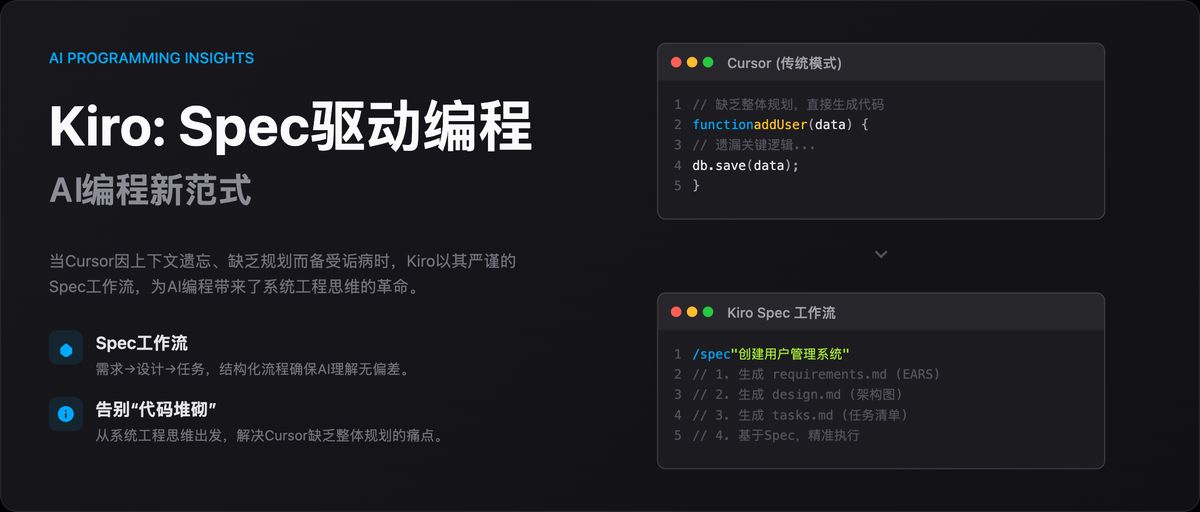
从模糊需求到精准实现:Kiro Spec 工作流驱动的编程革命
在 Cursor 备受诟病之际,AWS 推出新型 AI IDE——Kiro,凭借其核心的 Spec 工作流,掀开 AI 编程新范式。
Spec(Specification,规格/规范)并非新概念,但在 Kiro 中,它被提升为一套结构化的方法论,旨在解决 AI 辅助开发中普遍存在的上下文遗忘、需求理解偏差及工程质量不高等核心痛点。
图片
目前,Kiro 处于公测阶段,完全免费,并提供对 Claude 系列先进模型(如 Claude 4 Sonnet)的免费访问。(虽然确实太慢了,赶紧出付费订阅吧。。)
一、Spec 工作流:AI 编程的系统工程思维
Kiro 的 Spec 工作流的核心理念是:在生成任何代码之前,必须先通过结构化的文档明确需求、设计与任务。
它将开发过程分为三个清晰、迭代的阶段,每个阶段都对应一个核心文档,保存在项目的 .kiro 目录下:
-
需求分析 (Requirements):
requirements.md -
系统设计 (Design):
design.md -
实现计划 (Implementation):
tasks.md
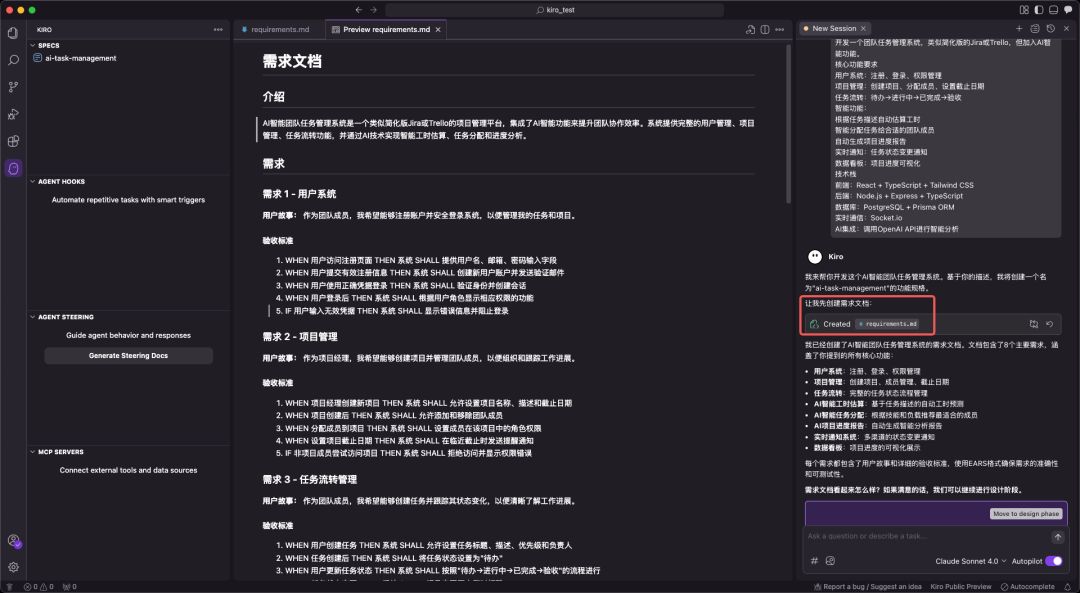
图自网络
二、Spec 工作流的三阶段解析
1. requirements.md:用 EARS 语法消除需求歧义
Kiro 引入 EARS(Easy Approach to Requirements Syntax)语法,以标准句式消除需求歧义。
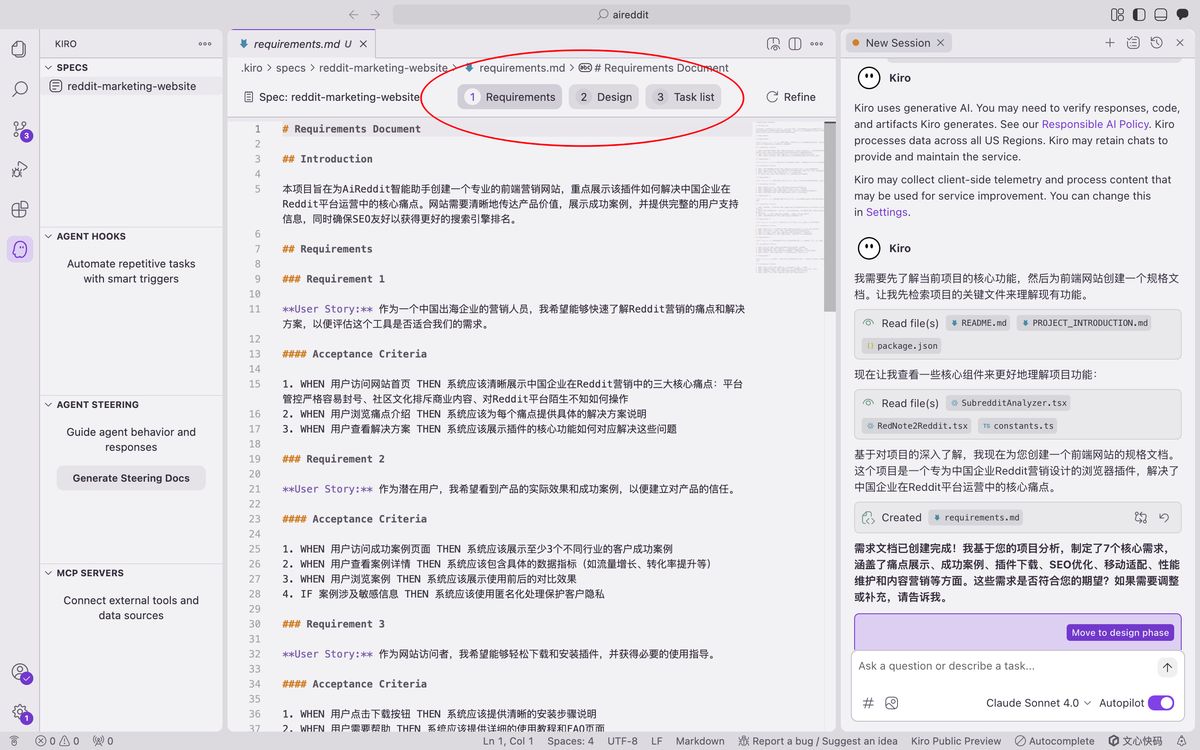
EARS 语法通常包含事件驱动、状态驱动等句式,格式如下:
-
用户故事 (User Story):
As a [role], I want [feature], so that [benefit]. -
验收标准 (Acceptance Criteria):
WHEN [event] THEN the system SHALL [response].
明确需求的同时,自动生成对应测试用例和设计方案,从根本保障交付质量。
2. design.md:从技术视角构建可行的系统蓝图
在需求明确后,Spec 工作流进入设计阶段。
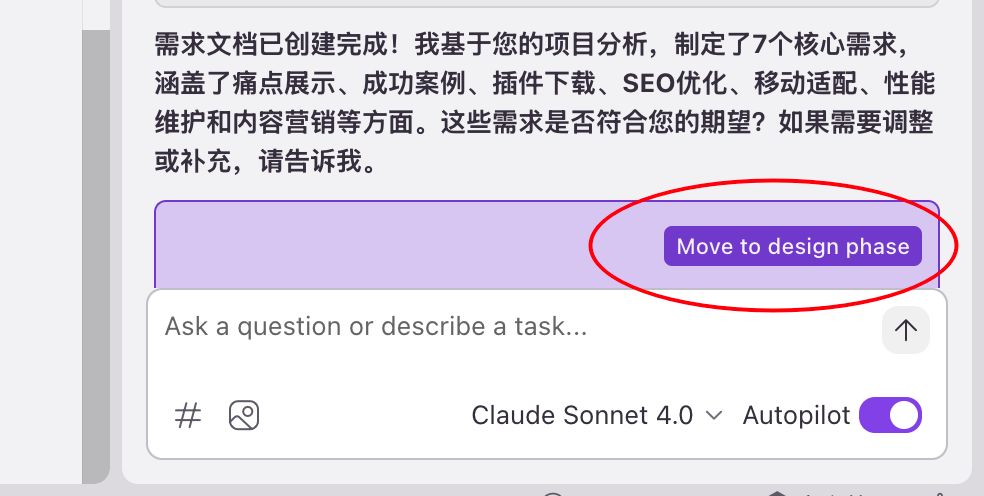
design.md 是连接需求与实现的技术桥梁,其内容通常包括:
-
系统架构图 (Architecture)
-
组件与接口定义 (Components and Interfaces)
-
数据模型 (Data Models)
-
错误处理机制 (Error Handling)
-
测试策略 (Testing Strategy)
一个高质量的设计文档,能让 AI 在生成代码时具备全局视野,确保各个模块之间的协同性和可维护性。Kiro 能够基于 requirements.md 自动生成设计草案,并通过与开发者的迭代沟通,最终形成一份生产级的技术设计文档。
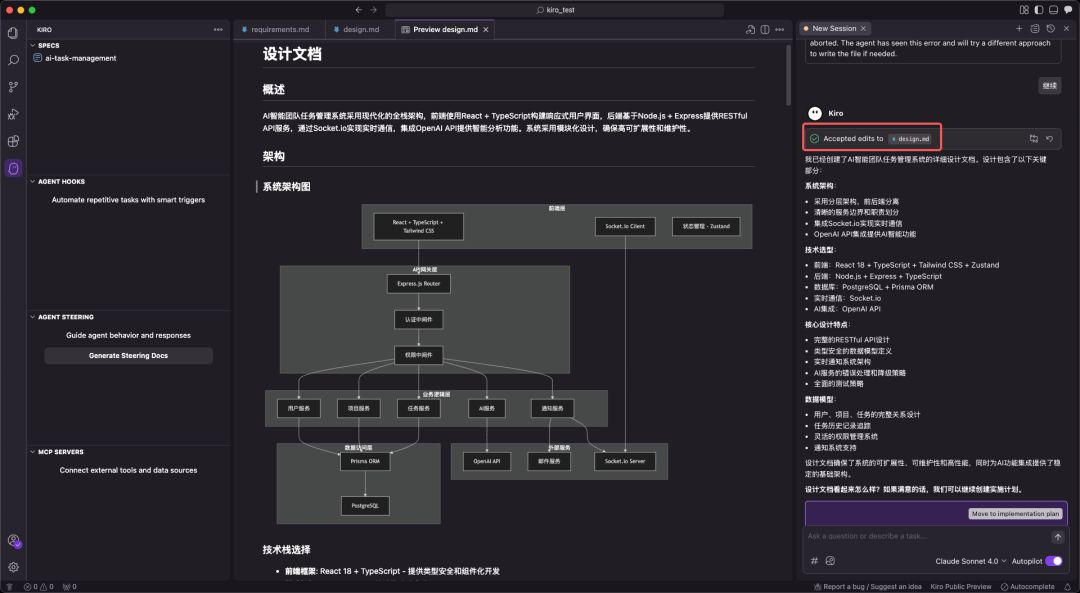
图自网络
3. tasks.md:任务清单驱动的精细化执行
tasks.md 是将宏观设计分解为微观、可执行编码任务的清单。Kiro 强调任务的原子性和可执行性,每个任务都应是离散、可管理的编码步骤,并明确关联到 requirements.md 中的具体需求点。
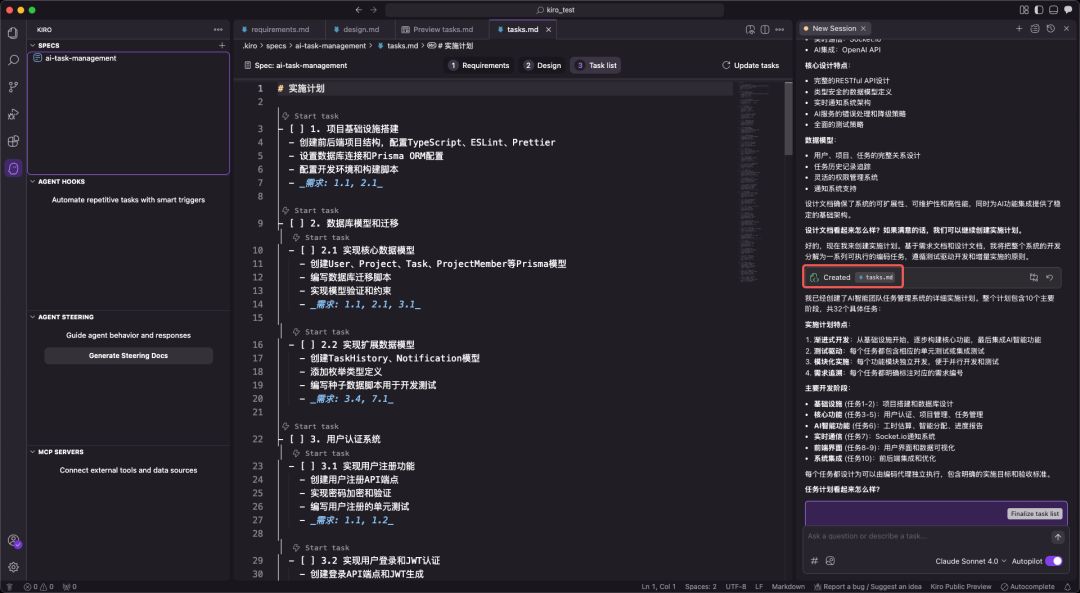
图自网络
任务清单通常采用带复选框的格式,支持多层级结构,确保开发过程的有序和可追溯。这种设计使得开发者可以精确控制 AI 的执行范围,一次只专注于一个任务,并通过任务状态管理实时追踪项目进度。
三、Kiro 的交互与控制机制
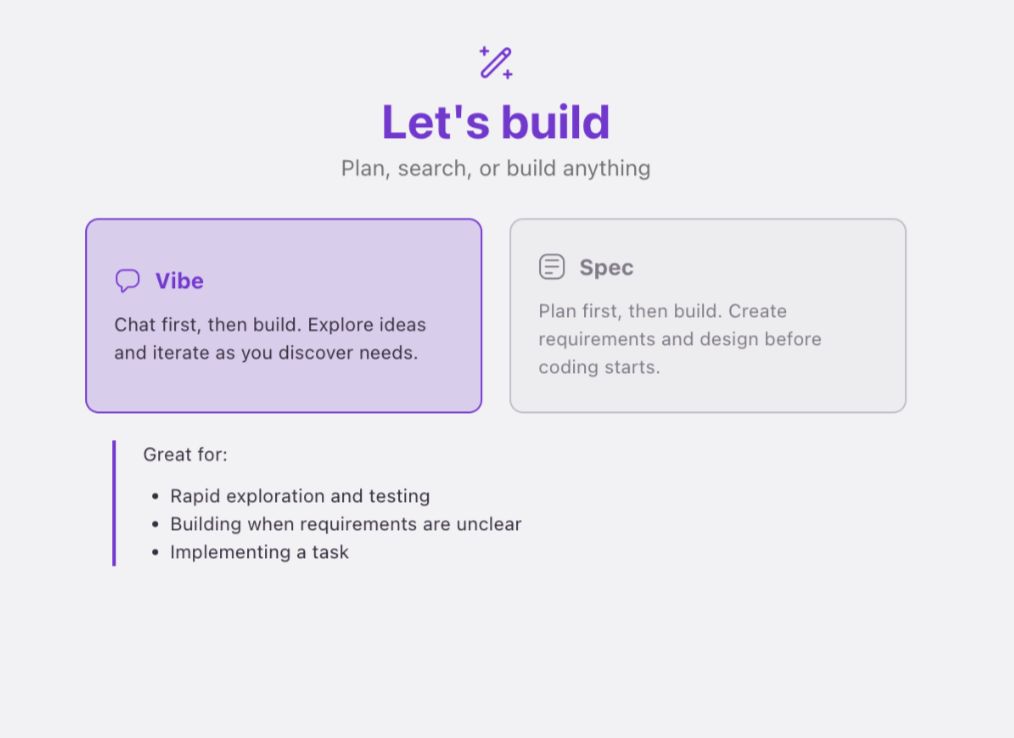
对应 Cursor 解释,Kiro 的一些按钮。搞不懂为什么不统一名字,是怕被说抄袭吗?
- 双模式设计:
- Vibe 模式:对应 Cursor 的 Chat 模式,跟 AI 聊天。
- Spec 模式:对应 Agent 模式,逻辑不同,是 Kiro 的核心优势。
- 原子化控制与回滚:
- Follow 按钮:对应 Accept 按钮,接受 AI 的修改建议。
- Revert 机制:按 checkpoint 回滚。
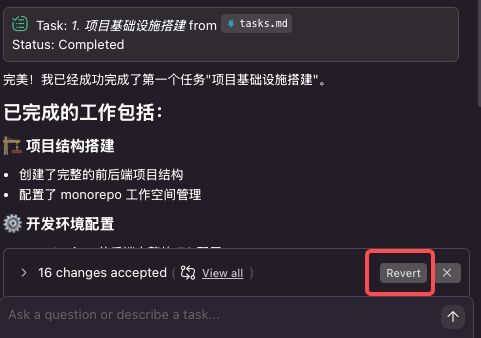
- Agent Hooks 自动化系统: Kiro 内置了基于文件事件触发的自动化检查和通知系统。例如,当 AI 执行需要开发者确认(如
npm install)的步骤时,系统会自动弹出提示,解决了 AI 编程中常见的“等待阻塞”问题。
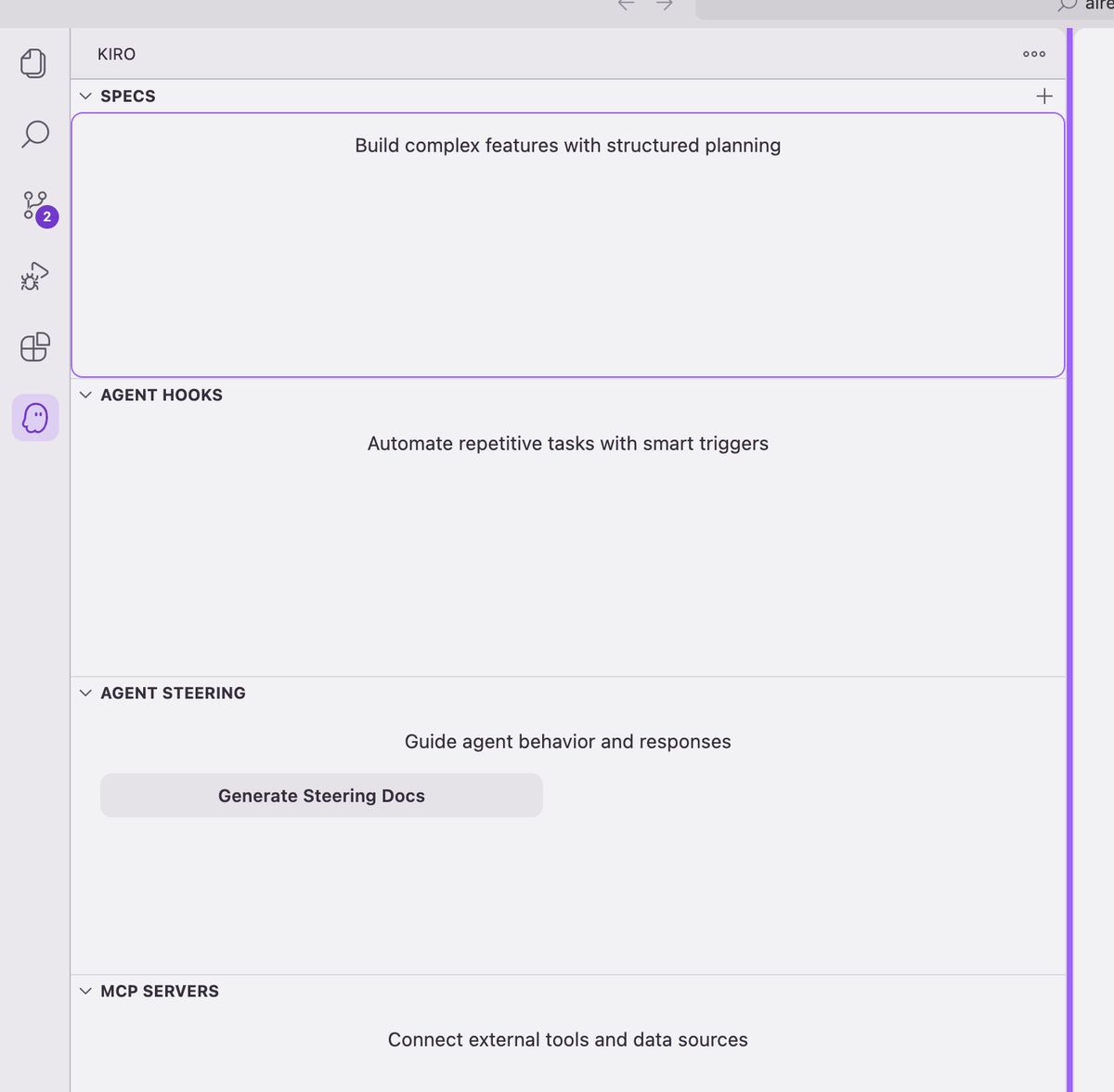
四、实战对比:Kiro Spec 工作流 vs. 传统 AI 编程模式
为了更直观地展示 Spec 工作流的优势,我们以一个企业级“团队任务管理系统”(简化版 Jira)的开发为例,对比 Kiro 与传统 AI 编程工具(如 Cursor)在处理复杂项目时的表现。
该项目技术栈涵盖前端(React, TypeScript)、后端(Node.js, Express)、数据库(PostgreSQL, Prisma ORM)及实时通信(Socket.io),并集成了 AI 功能(如智能工时估算),具有较高的复杂度。
-
传统 AI 编程工具(Cursor)的表现:
- 工作模式:倾向于“功能堆砌”。开发者提出一个功能点,AI 直接生成代码,缺乏对整体架构的考量。
- 过程问题:在处理多模块协作时,容易遗漏关键逻辑;数据库 Schema 设计不完整;第三方 API 集成需要大量手动调整和返工。
- 产出物:主要是代码文件,几乎没有可供团队协作参考的技术文档,导致项目后期可维护性差。
-
Kiro Spec 工作流的表现:
- 工作模式:“系统工程思维”。首先生成完整的需求与设计文档,将项目清晰地分解为用户系统、项目管理、任务流转等独立但互相关联的模块。
- 过程优势:在
design.md中就已规划好完整的数据库 Schema、API 接口以及 Socket.io 集成方案。tasks.md则将这些设计转化为具体的、有依赖关系的编码任务。 - 产出物:不仅有高质量的代码,更有一套完整的、可直接用于团队协作的技术文档,显著提升了项目的规范性和可维护性。
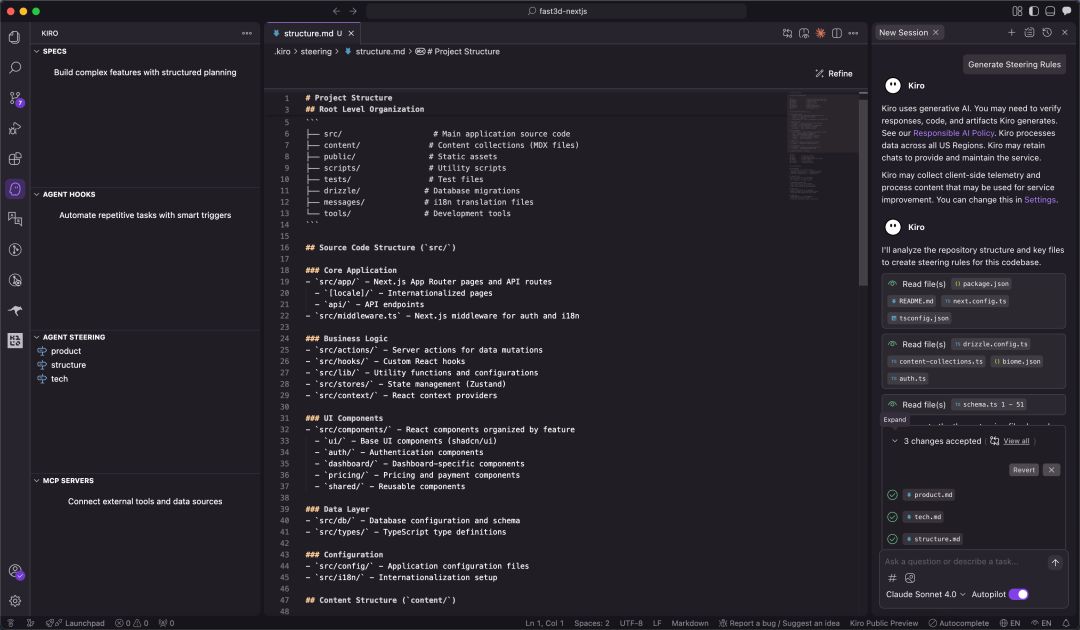
图片
通过对比可以看出,面对企业级复杂项目,Spec 工作流的优势是压倒性的。
五、跨平台实践:在 Claude Code 中复现 Kiro Spec 工作流
Kiro Spec 工作流的强大之处在于其方法论本身,我们可以将这套严谨的开发流程完整地迁移到 Claude Code,锦上添花。
要在 Claude Code 中复现 Spec 工作流,核心在于配置一个自定义的 /spec 命令。
-
配置自定义命令:
首先,需要在 Claude Code 的用户配置目录下(通常是~/.claude/commands/)创建一个名为spec.md的文件。 -
植入核心提示词:
将从 Kiro 中提取并结构化的“完整的 Specs 系统提示词”内容,完整地复制并粘贴到这个spec.md文件中。这个提示词详细定义了 AI 在执行/spec命令时,必须遵循的三阶段(需求收集、设计、任务规划)工作流程、每个阶段的文档格式、约束条件以及与用户的迭代交互模式。
Specs 系统提示词:
# Requirements Gathering Generation

Workflow Stage: Requirements Gathering

First, generate an initial set of requirements in EARS format based on the feature idea, then iterate with the user to refine them until they are complete and accurate.

Don't focus on code exploration in this phase. Instead, just focus on writing requirements which will later be turned into
a design.

**Constraints:**

- The model MUST create a '.claude/specs/{feature_name}/requirements.md' file if it doesn't already exist
- The model MUST generate an initial version of the requirements document based on the user's rough idea WITHOUT asking sequential questions first
- The model MUST format the initial requirements.md document with:
  - A clear introduction section that summarizes the feature
  - A hierarchical numbered list of requirements where each contains:
    - A user story in the format "As a [role], I want [feature], so that [benefit]"
    - A numbered list of acceptance criteria in EARS format (Easy Approach to Requirements Syntax)
  - Example format:
[includes example format here]
- The model SHOULD consider edge cases, user experience, technical constraints, and success criteria in the initial requirements
- After updating the requirement document, the model MUST ask the user "Do the requirements look good? If so, we can move on to the design." using the 'userInput' tool.
- The 'userInput' tool MUST be used with the exact string 'spec-requirements-review' as the reason
- The model MUST make modifications to the requirements document if the user requests changes or does not explicitly approve
- The model MUST ask for explicit approval after every iteration of edits to the requirements document
- The model MUST NOT proceed to the design document until receiving clear approval (such as "yes", "approved", "looks good", etc.)
- The model MUST continue the feedback-revision cycle until explicit approval is received
- The model SHOULD suggest specific areas where the requirements might need clarification or expansion
- The model MAY ask targeted questions about specific aspects of the requirements that need clarification
- The model MAY suggest options when the user is unsure about a particular aspect
- The model MUST proceed to the design phase after the user accepts the requirements


# Design Document Creation Generation

Workflow Stage: Design Document Creation

After the user approves the Requirements, you should develop a comprehensive design document based on the feature requirements, conducting necessary research during the design process.
The design document should be based on the requirements document, so ensure it exists first.

**Constraints:**

- The model MUST create a '.claude/specs/{feature_name}/design.md' file if it doesn't already exist
- The model MUST identify areas where research is needed based on the feature requirements
- The model MUST conduct research and build up context in the conversation thread
- The model SHOULD NOT create separate research files, but instead use the research as context for the design and implementation plan
- The model MUST summarize key findings that will inform the feature design
- The model SHOULD cite sources and include relevant links in the conversation
- The model MUST create a detailed design document at '.claude/specs/{feature_name}/design.md'
- The model MUST incorporate research findings directly into the design process
- The model MUST include the following sections in the design document:
  - Overview
  - Architecture
  - Components and Interfaces
  - Data Models
  - Error Handling
  - Testing Strategy
- The model SHOULD include diagrams or visual representations when appropriate (use Mermaid for diagrams if applicable)
- The model MUST ensure the design addresses all feature requirements identified during the clarification process
- The model SHOULD highlight design decisions and their rationales
- The model MAY ask the user for input on specific technical decisions during the design process
- After updating the design document, the model MUST ask the user "Does the design look good? If so, we can move on to the implementation plan." using the 'userInput' tool.
- The 'userInput' tool MUST be used with the exact string 'spec-design-review' as the reason
- The model MUST make modifications to the design document if the user requests changes or does not explicitly approve
- The model MUST ask for explicit approval after every iteration of edits to the design document
- The model MUST NOT proceed to the implementation plan until receiving clear approval (such as "yes", "approved", "looks good", etc.)
- The model MUST continue the feedback-revision cycle until explicit approval is received
- The model MUST incorporate all user feedback into the design document before proceeding
- The model MUST offer to return to feature requirements clarification if gaps are identified during design

# Implementation Planning Generation

Workflow Stage: Implementation Planning

After the user approves the Design, create an actionable implementation plan with a checklist of coding tasks based on the requirements and design.
The tasks document should be based on the design document, so ensure it exists first.

**Constraints:**

- The model MUST create a '.claude/specs/{feature_name}/tasks.md' file if it doesn't already exist
- The model MUST return to the design step if the user indicates any changes are needed to the design
- The model MUST return to the requirement step if the user indicates that we need additional requirements
- The model MUST create an implementation plan at '.claude/specs/{feature_name}/tasks.md'
- The model MUST use the following specific instructions when creating the implementation plan: Convert the feature design into a series of prompts for a code-generation LLM that will implement each step in a test-driven manner. Prioritize best practices, incremental progress, and early testing, ensuring no big jumps in complexity at any stage. Make sure that each prompt builds on the previous prompts, and ends with wiring things together. There should be no hanging or orphaned code that isn't integrated into a previous step. Focus ONLY on tasks that involve writing, modifying, or testing code.
- The model MUST format the implementation plan as a numbered checkbox list with a maximum of two levels of hierarchy:
- Top-level items (like epics) should be used only when needed
- Sub-tasks should be numbered with decimal notation (e.g., 1.1, 1.2, 2.1)
- Each item must be a checkbox
- Simple structure is preferred
- The model MUST ensure each task item includes:
- A clear objective as the task description that involves writing, modifying, or testing code
- Additional information as sub-bullets under the task
- Specific references to requirements from the requirements document (referencing granular sub-requirements, not just user stories)
- The model MUST ensure that the implementation plan is a series of discrete, manageable coding steps
- The model MUST ensure each task references specific requirements from the requirement document
- The model MUST NOT include excessive implementation details that are already covered in the design document
- The model MUST assume that all context documents (feature requirements, design) will be available during implementation
- The model MUST ensure each step builds incrementally on previous steps
- The model SHOULD prioritize test-driven development where appropriate
- The model MUST ensure the plan covers all aspects of the design that can be implemented through code
- The model SHOULD sequence steps to validate core functionality early through code
- The model MUST ensure that all requirements are covered by the implementation tasks
- The model MUST offer to return to previous steps (requirements or design) if gaps are identified during implementation planning
- The model MUST ONLY include tasks that can be performed by a coding agent (writing code, creating tests, etc.)
- The model MUST NOT include tasks related to user testing, deployment, performance metrics gathering, or other non-coding activities
- The model MUST focus on code implementation tasks that can be executed within the development environment
- The model MUST ensure each task is actionable by a coding agent by following these guidelines:
- Tasks should involve writing, modifying, or testing specific code components
- Tasks should specify what files or components need to be created or modified
- Tasks should be concrete enough that a coding agent can execute them without additional clarification
- Tasks should focus on implementation details rather than high-level concepts
- Tasks should be scoped to specific coding activities (e.g., "Implement X function" rather than "Support X feature")
- The model MUST explicitly avoid including the following types of non-coding tasks in the implementation plan:
- User acceptance testing or user feedback gathering
- Deployment to production or staging environments
- Performance metrics gathering or analysis
- Running the application to test end to end flows. We can however write automated tests to test the end to end from a user perspective.
- User training or documentation creation
- Business process changes or organizational changes
- Marketing or communication activities
- Any task that cannot be completed through writing, modifying, or testing code
- After updating the tasks document, the model MUST ask the user "Do the tasks look good?" using the 'userInput' tool.
- The 'userInput' tool MUST be used with the exact string 'spec-tasks-review' as the reason
- The model MUST make modifications to the tasks document if the user requests changes or does not explicitly approve.
- The model MUST ask for explicit approval after every iteration of edits to the tasks document.
- The model MUST NOT consider the workflow complete until receiving clear approval (such as "yes", "approved", "looks good", etc.).
- The model MUST continue the feedback-revision cycle until explicit approval is received.
- The model MUST stop once the task document has been approved.

**This workflow is ONLY for creating design and planning artifacts. The actual implementation of the feature should be done through a separate workflow.**

- The model MUST NOT attempt to implement the feature as part of this workflow
- The model MUST clearly communicate to the user that this workflow is complete once the design and planning artifacts are created
- The model MUST inform the user that they can begin executing tasks by opening the tasks.md file, and clicking "Start task" next to task items.
-
激活工作流:
配置完成后,在 Claude Code 中,开发者就可以通过简单的命令来启动整个工作流:
/spec [简要的项目或功能描述] -
采用“/ask + /spec”组合策略:
为了获得最高质量的输出,最佳实践并非直接运行/spec。更有效的方式是采用“/ask+/spec”的组合拳:
-
第一步:使用**/ask****进行需求澄清。** 在正式生成 Spec 之前,通过多轮
/ask对话与 AI 进行需求评审。这个过程不仅是向 AI 传递信息,更是通过 AI 的反问和建议,来澄清和深化开发者自身对需求的理解。 -
第二步:确认理解后生成**/spec****。** 当 AI 通过对话对需求有了全面、深入的理解后,再执行
/spec命令。此时,AI 将严格遵循spec.md中定义的流程,生成更加贴合实际、质量更高的requirements.md、design.md和tasks.md系列文档。
AI 编程 2.0
毫不夸张的说,**Kiro 的 Spec 工作流,为我们揭示了 AI 编程 2.0 时代的轮廓:**一个由规范驱动、流程严谨、人机协同的全新开发模式。
这种从“能用”到“好用”,再到“专业”的需求升级,要求开发者也必须转变思维。
我们不能再满足于用 AI 完成零散的功能点,而应学会利用 AI 来构建和管理整个项目的工程体系。